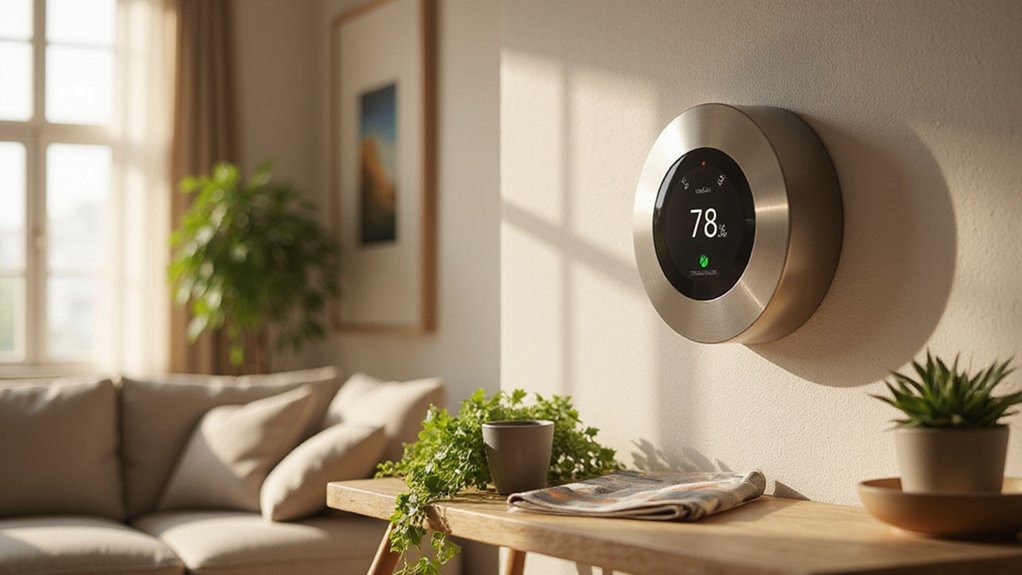
What Can a Smart Thermostat Accomplish?
If you’re tired of high energy bills and inconsistent comfort at home, a smart thermostat might be the change you need.
It can save you up to $200 a year by optimizing your heating and cooling automatically. With features like remote control, automatic learning, and energy-saving settings, it puts more control and efficiency at your fingertips.
The full details below show how it can make a real difference for your home.
How Much Can a Smart Thermostat Actually Cut Your Energy Bills?
A smart thermostat can typically save you around 8% of your heating and cooling bills annually, which amounts to roughly $50 per year. Larger savings are possible depending on your habits and equipment. For example, reducing your thermostat by 7 to 10 degrees Fahrenheit for about eight hours daily can yield approximately 10% in energy savings, according to the Department of Energy. More advanced models can deliver higher reductions: Nest reports 12 to 15% annual savings—that’s about $131 to $145—and ecobee claims savings up to 26%, or roughly $200 annually. For those also upgrading their cooling system, choosing from the top window air conditioners can further enhance efficiency and comfort. These devices achieve this by learning your schedule and automatically adjusting temperatures, which is a key smart thermostat capability that reduces waste. To maintain optimal efficiency, regularly cleaning the fan prevents mold and buildup that can impede airflow.
Your previous behavior significantly influences how much you can save. If you already used setbacks or manual adjustments, a smart thermostat may offer smaller gains. Conversely, if you ran a fixed temperature all day, automation can substantially cut costs by optimizing your heating and cooling without you needing to think about it. According to Vivint, typical savings range from $50 to $200 annually, with some users saving as much as $300.

An Alexa thermostat - Amazon Smart Thermostat is an easy way to switch from a traditional thermostats for homes and help reduce energy usage.

ENERGY STAR certified smart thermostat for home that helps you save energy and stay comfortable.Product note: You can also check your system’s compatibility before purchasing a Nest thermostat with our online Nest Compatibility Checker on the Google Nest support page.Connectivity Protocol : Wi-Fi.Connectivity Protocol : Wi-Fi

Saves you energy automatically — Save up to 26% per year on heating and cooling costs.* The Smart Thermostat Enhanced automatically adjusts your home’s temperature when you’re away or asleep, helping reduce energy use without sacrificing comfort.
Can You Control Your Smart Thermostat From Anywhere With Your Phone?
Yes, you can control your smart thermostat from anywhere using your phone. The app allows you to check your current indoor temperature, your target temperature, and even review your energy history. Need to adjust your schedule on the fly? You can do so remotely, no matter where you are. If you want to set a temporary hold or boost the heat or cool, that’s easy too. Just keep in mind that remote control depends on a stable internet connection and your thermostat staying online. While different brands may have slightly varied features, the core functions remain the same: complete control from anywhere at any time. For optimal comfort, you should also consider how your system handles excess humidity in your bedroom. This remote access also enables pre-heating or cooling before you arrive home, as your smartphone app can adjust the temperature in advance. For larger living spaces, pairing your thermostat with a top-rated humidifier can help maintain balanced moisture levels throughout the room. However, an essential oil diffuser can serve as a practical humidifier for small spaces, offering dual functionality when used correctly.
Does a Smart Thermostat Learn Your Schedule Automatically?
Most smart thermostats do learn your schedule automatically, but this feature isn’t available on every model. If your thermostat supports it, you’ll need to enable the learning feature—such as Auto-Schedule on Nest devices. Once activated, your manual adjustments serve as the starting point. Each time you change the temperature through the app or directly on the device, the thermostat records your preference. Energy savings are a key benefit of these learning capabilities. It actively learns from your behavior, recognizing patterns like waking up or going to sleep, and even considers occupancy. After a few days, it begins to build a personalized schedule, which usually stabilizes within about a week. The thermostat continually adapts based on your routines, but it only updates its schedule after at least two similar manual changes. For best results, a dehumidifier in the basement can help maintain consistent humidity levels while the thermostat optimizes temperature. If you prefer a fixed schedule, you can turn off the learning mode at any time and switch it back on later when needed. For spaces with high moisture, air dehumidifiers prove more effective than purifiers at managing dampness.
How Smart Thermostat Geofencing Stops Waste the Second You Leave
Geofencing instantly switches your thermostat to away mode the moment your phone crosses the virtual boundary, which helps cut HVAC runtime and reduce waste right away. You don’t need to adjust anything manually—your location does the work. ENERGY STAR reports that in homes with fluctuating occupancy, this feature can lower annual HVAC runtime by 10 to 15 percent by preventing energy loss from forgotten settings. For homes without traditional window access, users may need to pair their system with a windowless air conditioner to achieve similar efficiency benefits.
The system also offers preconditioning. As you approach home, the thermostat starts warming or cooling so you arrive to a comfortable environment without extra energy use. However, geofencing depends on your phone’s continuous location tracking, raising privacy concerns. You’re essentially trading your location data for energy savings. For unpredictable schedules, this setup can reduce HVAC costs by about 8 to 20 percent each year, depending on how often you come and go and your local climate. Using a best dehumidifier can also help keep centipedes out of your home by reducing moisture that attracts them. Regularly inspecting the condition of humidifier filters is important because dirty filters can reduce air quality and system efficiency.

PRIVACY PROTECTION*: Sensi won’t sell your personal information to third parties

High use of the scheduling feature of the T5 thermostat saved customers between 8 and 16% on heating and cooling bills. Dollar savings range based on nationwide average annual single-family detached home's heat and cooling bills; actual savings varies based on consumption.

Save up to 23% every year on heating and cooling costs, adjusts to your set schedule to save energy when you’re gone and optimize comfort when you’re home. Compared to a hold of 72
What Your Smart Thermostat Reveals About Your Energy Usage
Smart thermostats reveal your energy usage through detailed data collection. They track your occupancy patterns, correlating temperature changes with your work hours, sleep schedule, and when you’re away. Frequent manual adjustments indicate personal preferences and possible inefficiencies. Analyzing your setpoint strategies shows that maintaining higher average temperatures can lead to savings, as demonstrated by a study in California. Your device also logs HVAC runtime on daily or weekly scales, highlighting peak demand periods and how weather affects consumption. During cold snaps, energy use spikes, and your app compares your data to previous weeks and community benchmarks. This comprehensive feedback helps you identify waste, optimize scheduling, and reduce costs—all without any extra effort on your part. Furthermore, recognizing that high run times during moderate weather can signal inefficiency helps you detect problems like poor insulation or an aging HVAC system. Just as a smart thermostat optimizes climate control, a ceiling fan with LED light can improve room comfort and energy efficiency through integrated lighting and airflow.
Why Voice Control Makes Temperature Tweaks Effortless
Voice control makes temperature adjustments effortless, especially if mobility challenges make reaching the wall unit difficult. You can give commands from another room, eliminating the need to physically locate the thermostat. Natural speech conversion simplifies the process, making it feel less technical than using apps. This encourages timely adjustments without hassle. The result is near-instant climate changes achieved with minimal effort, turning routine temperature tweaks into a seamless, spoken interaction. This hands-free capability is further enhanced by integration with Siri and Alexa, allowing you to adjust the temperature using simple voice commands. Pairing a smart thermostat with a cool mist humidifier can also help maintain comfortable humidity levels while you control the temperature. For severe water damage scenarios, a dehumidifier for water damage can restore indoor air quality alongside climate control. Understanding the proper maintenance of these devices ensures consistent performance and extends their lifespan.

【Full Remote Control Via Smartphone App】Tweak your heating and cooling settings remotely from your phone. Pre‑warm or cool your house on your commute home, modify schedules and monitor device status away from home. Never step into an uncomfortably hot or cold living space again with Siterwell wifi thermostats for home.

ENERGY STAR certified smart thermostat for home that helps you save energy and stay comfortable.Connectivity : Wi-Fi - 802.11b/g/n 2.4 GHz, 802.11a/n 5 GHz Wi-Fi., Wireless interconnect : Bluetooth Low Energy Please refer to the product description section below for all applicable legal disclaimers.Product note: You can also check your system’s compatibility before purchasing a Nest thermostat with our online Nest Compatibility Checker on the Google Nest support page
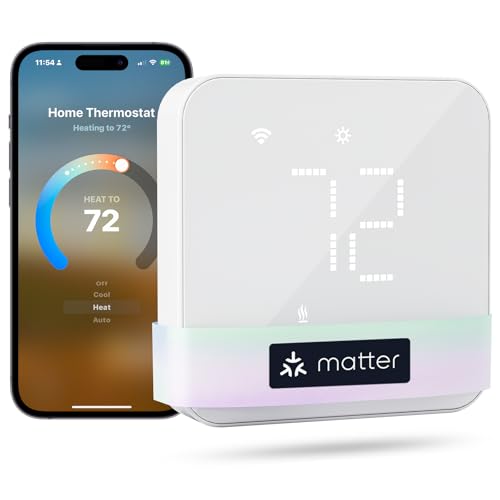
Before You Buy: Some wiring configurations require a C wire (not included). Please verify compatibility before purchasing. Meross smart thermostat for home is suitable for 95% of HVAC systems, including heat pump, air conditioner, furnace, boiler, dehumidifier, humidifier. Not suitable for 110V/120V/240V electric baseboard heaters, millivolt thermostat and two wire sysytems.
How Smart Thermostats Sync With Your Other Home Devices
When your smart thermostat syncs with other home devices, it becomes a key component in your automated system. Start by checking device compatibility—look for “Works with” labels for platforms like Alexa, Google Home, or Apple HomeKit to ensure smooth setup. Once compatible, ecosystem integration allows you to create routines: for example, your thermostat can lower the temperature when you unlock the door or your smart blinds can close to reduce cooling needs. Using geofencing, your phone’s location can trigger away mode when you leave the house. Motion sensors can automatically adjust room temperatures based on occupancy. Additionally, you can link your lighting to dim during sleep hours or have security alarms reduce energy use when you exit. Most platforms streamline pairing and voice control through a single app, giving you control over all connected devices from one interface. For homes with devices from different brands, a hub like SmartThings helps bridge Zigbee, Z-Wave, and Wi-Fi gadgets, turning a mixed network into a seamless, responsive system. For more targeted airflow, you can also incorporate a DIY oscillating fan that syncs with your thermostat to circulate cool air only in occupied zones. You may also consider replacing a thermostat’s air filters with a high-performance air purifier or ionizer to improve indoor air quality while managing energy savings. When selecting an air cleaning device, understanding the water air purifier vs hepa differences can help you choose the best option for your space and performance needs.

Apple Adaptive Temperature - With the Apple Home app, Adaptive Temperature uses your iPhone to adjust the thermostat based on activity states like 'home', 'sleep', 'away' and 'extended away'. This provides comfort upon arrival home and saves energy when away, without the complicated steps of creating or managing schedules. (Note: Adaptive Temperature requires a home hub (Apple TV or HomePod) and an iPhone or Apple Watch, all running version 26 or later.)

Save up to 26% on your energy bills: ENERGY STAR certified. Automatically adjusts your temperature based on occupancy. Compared to a hold of 72°F

WHEN RELIABILITY MATTERS: The Lutron Smart Hub works without Wi-Fi, providing ultra-fast, reliable performance beyond a typical wifi switch for dependable smart lighting
Do Smart Thermostats Qualify for Utility Rebates?
Yes, many utility companies offer rebates for smart thermostats, but eligibility is not automatic. You need to meet specific criteria set by your utility, which commonly include ENERGY STAR certification, Wi-Fi capability, and being a residential customer. Make sure to check the deadline for submitting proof of purchase, as these rebates typically have a designated window.
Rebates can take the form of instant discounts at participating retailers or mail-in reimbursements. The amounts vary widely, usually between $50 and $125 or more, with higher rebates often available for income-qualified customers. Some utilities, like Con Edison or Puget Sound Energy, offer additional incentives tied to demand-response programs, providing annual rewards for remaining enrolled.
Before applying, verify that your heating and cooling system, as well as your thermostat model, are listed as eligible by your utility. Keep in mind that rebates are often capped per account and cannot exceed the purchase price of the thermostat. Always review your utility’s portal or contact customer service to confirm eligibility and to ensure you meet all requirements. For those also concerned about indoor air quality, some smart thermostats can be paired with top air purifiers to manage both temperature and pet dander effectively.

COMMON WIRE REQUIREMENTS: Designed to work without a C-wire in most homes, but for some systems, including heating only, cooling only, and heat pump systems, you’ll need a C-wire or other compatible power accessory

WORKS WITH ROOM SENSORS: Compatible with Sensi Room Sensors to balance temperatures throughout your home (sold separately)

【Do a Simple Check】Please scan the QR code to do a check if vine thermostat is compatible with your home before purchase. A common wire (C-wire) is required for all vine thermostat
What Maintenance Alerts and Energy Reports Prevent Costly Repairs?
Energy reports serve as continuous equipment diagnostics for your home systems. They track key data such as runtime hours, temperature performance, and energy consumption patterns. When your heating or cooling doesn’t meet the desired setpoint or energy use increases unexpectedly, the thermostat alerts you. These notifications help identify developing faults early, often before they cause a breakdown. Temperature and humidity alerts also work to prevent damage from freeze or overheating conditions. By catching issues early through these alerts and detailed reports, you can avoid costly repairs and keep your system operating efficiently.