How to Clean a Tower Fan Without Taking It Apart
Wondering how to keep your tower fan clean without taking it apart? It’s easier than you might think.
With a few simple steps, you can remove dust and grime from the exterior and vents. This quick routine helps maintain good airflow and keeps your fan working efficiently.
By the end of this, you’ll know how to give your tower fan a thorough clean using common tools, all without the hassle of dismantling it.
Let’s get started with the best way to do it.
Step 1: Unplug and Place the Fan on a Flat Surface
Unplugging the fan before cleaning is essential for your safety. This step ensures the fan won’t accidentally turn on while you’re working, preventing injury from moving blades or catching fingers or cloths in the blades. Always disconnect power and keep the fan unplugged until it is completely dry, even if you’re only dusting the exterior vents.
Next, move the unplugged fan to a flat, stable surface. Stability reduces the risk of tipping over, especially since tall units can be top-heavy. Choose a well-lit, ventilated area like a garage to work in. Proper ventilation helps contain dust, preventing it from settling back onto furniture or electronics. Handle the fan carefully, keeping it upright to maintain control and allow for safe, efficient cleaning from top to bottom. For thorough dust removal without taking the fan apart, use an air compressor to blow dust out from difficult-to-reach areas like behind the cage and motor. Additionally, using a humidifier for cough relief in a separate room can help soothe dry airways while you clean. Additionally, running a dehumidifier for silverfish in the same room helps reduce humidity that attracts pests like silverfish to dusty fan areas. For a more comprehensive cooling solution, you might consider a window air conditioner instead of relying solely on a tower fan.
What You’ll Need for a No-Take-Apart Clean
To clean your tower fan without taking it apart, you’ll need a few essential tools. Start with a vacuum equipped with a brush attachment. This tool is great for pulling dust from vents and loosening grime embedded in hard-to-reach areas. Microfiber cloths are also vital—they trap dust and particles instead of spreading them around, making your wiping more effective. Compressed air in short bursts helps clear debris from narrow channels and crevices, especially when used alongside the vacuum to prevent particles from resettling. Keep a mild cleaner nearby; always apply it to the cloth, not directly on the fan, to avoid damage. Small brushes or cotton swabs can help tidy up tight spaces and difficult corners. Using these tools together streamlines the cleaning process, enhancing airflow and efficiency without the need for disassembly. For a deeper clean without taking the fan apart, you can also prepare a cleaning mixture of toothpaste, hot water, dish soap, and vinegar, which you spray lightly onto the fan guard and blades before wiping down. To further prevent microbial growth, regularly cleaning the fan with rubbing alcohol can help keep mold from developing in damp conditions. For those with respiratory concerns, using a humidifier for wheezing can also help ease breathing when combined with a clean fan. Since centipedes are attracted to moisture, running a dehumidifier for centipedes in your home can further deter them by reducing the humidity that supports mold and damp conditions.

Efficient cleaning: This set includes 3 bendable fan dusters with microfiber heads, fan cleaner allowing you to easily remove dust and dirt from ceiling fans, floor vent fan,air conditioning vents, curtains, and more.
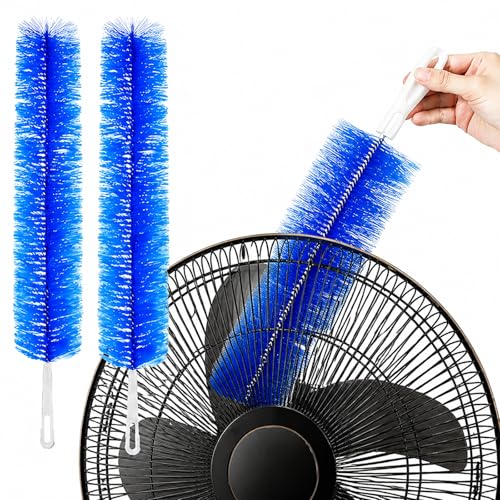
Easy Operation: Clean dust and pet hair from fans and grills without disassembly. Reusable and washable; built-in hanging hole for convenient storage.

Fan Cleaner and Fan Duster Set: This set includes 2 bendable fan dusters with microfiber heads, easily removing dust and dirt from ceiling fans, floor fans, air conditioning vents, curtains and more for daily home cleaning.
How to Vacuum Dust From Vents Without Opening the Fan
To vacuum dust from your fan’s vents without opening the case, use a vacuum cleaner equipped with a brush attachment or a narrow hose nozzle. Keep the attachment close to the vent slits and activate the vacuum, as suction lifts loose dust instead of pushing debris further inside. Work slowly, moving from top to bottom of each vent to prevent falling dust from resettling onto cleaned areas. Remember to include rear vents or base openings in your cleaning routine. Use a dry paintbrush to gently agitate trapped dust while the vacuum hose collects it, which helps dislodge stubborn particles. Always unplug the fan before cleaning, and perform this task outdoors or in a well-ventilated space to maintain indoor air quality. For optimal results, consider a vacuum with HEPA filters that trap fine particles, which also helps prevent mold and buildup inside the fan housing. Repeat this process every few weeks to keep airflow efficient, reduce the need for deeper cleaning, and maintain clean vents without disassembling the fan. A vacuum with a brush attachment helps surface dust removal from exterior vents.

Home Essentials: Holikme dryer vent cleaner kit can easily help you to remove years of built up lint from your dryer vent, making your appliance runs more efficiently and securely; Suitable for most dryer types, please kindly check our product size information for reference in order to better shopping experience

Comprehensive Cleaning Set – Includes flexible vacuum hoses, lint brushes, crevice tools, and universal adapters for complete dryer vent and home maintenance

Home Improvement Helper: Use Sealegend dryer vent cleaner kit remove years of buildup lint to maintain your appliance performance. Fits most dryer models; check product size specs to verify fit prior for better shopping experience
Reaching Tight Slots With a Brush or Compressed Air
To reach dust lodged in tight slots, use short bursts of compressed air aimed diagonally to lift debris without pushing it further into the fan. Holding the fan upright helps the airflow dislodge particles more effectively. Repeat passes over the full vent height for thorough cleaning. For stubborn ridges of dust, soften and loosen particles with a soft-bristle brush such as a paintbrush or toothbrush—these won’t scratch plastic surfaces. After using compressed air, follow up with gentle brushing to sweep away remaining dust from slot edges. For tight gaps where brushes can’t reach, use cotton swabs or wrap a cloth around a chopstick to get into narrow spaces. Always unplug the fan before cleaning and keep moisture away from electrical components. Work from top to bottom, combining air bursts with a vacuum brush attachment to collect loose debris. Multiple passes may be necessary to remove compacted grime from each narrow slot effectively. If the motor remains stiff, gently assist its movement and apply lubricant to the motor and base for smoother operation. For a more thorough clean, consider using a small ultrasonic diffuser to gently mist the area with water and loosen dried dust. Proper placement of the fan near a well-lit area can help you see dust buildup more clearly, similar to how correct thermostat placement improves temperature readings. Unlike a reed diffuser, which relies on capillary action to steadily draw scent upward through porous reeds, compressed air here works by force rather than absorption, so aim bursts from a safe distance to avoid scattering debris into the room.

Reusable Cordless Air Duster: Replace disposable compressed air cans with a rechargeable electric blower for keyboards, PC towers, car interiors and home devices

Keep electronic devices neat and clean

170,000 RPM Handheld Brushless Power - Built with a high-speed brushless motor, this handheld electric air duster delivers strong, steady airflow to remove dust, crumbs and debris from keyboards, PC cases, fans, vents and other hard-to-reach spaces without direct contact.
How to Wipe the Outer Casing Without Damage
Once the tight slots are clear, focus on wiping the outer casing. Start by unplugging the fan and letting it cool completely. Use a microfiber cloth, which effectively lifts dust without scratching the surface. Slightly dampen the cloth—just enough to pick up dirt—being careful to prevent any liquid from seeping into vents or electronic components. Unlike conventional fans that rely on exposed blades, bladeless fans use an air multiplier to draw in and amplify airflow through a hidden impeller. Gently wipe the top, sides, and base, applying light pressure. For the control panel, keep the cloth barely damp to avoid disturbing buttons and displays. For stubborn grime, add a tiny drop of mild dish soap to the cloth before wiping. Remember to wipe separately around seams and the power input area for thorough cleaning. After cleaning, dry all surfaces completely with a clean, dry cloth. This prevents water spots and damage. Avoid using bleach or abrasive cleaners, as they can harm the casing’s finish. Regular wiping like this maintains your fan’s appearance safely without the need for disassembly. Unlike essential oil blends used in home fragrance diffusers, these cleaning methods focus only on mechanical dust removal rather than scent dispersion.
Clearing Internal Dust Without Opening the Fan
You can clear internal dust from the fan without opening it by using a vacuum and compressed air. Start by vacuuming the front and rear vents with a brush attachment to lift surface debris. Then, take the fan outside and blast compressed air into the vents in short bursts, moving from top to bottom. Blow from both sides of the fan to push dust out the opposite vent, helping to dislodge particles. Immediately after blowing, vacuum the rear vents again to capture loosened dust. Repeat this cycle if heavy dust remains. If your fan has accessible bottom vents, lay it on its side to clean those areas as well. This method restores the fan’s power by removing internal dust and debris that accumulates after just one season of indoor use. For a home environment where moisture may also be a concern, a bedroom dehumidifier can help reduce humidity levels that contribute to dust mite activity. Keep in mind, this method only removes loose dust; it won’t substitute for heater maintenance or filter replacements if your fan includes sealed components. Avoid aiming compressed air directly at sensitive electronic parts to prevent damage. To further prevent buildup, regularly wiping down the exterior with a damp cloth can stop mold and buildup from forming on the fan’s surface. Additionally, remember that while a fan is generally safer than a space heater, you should still follow basic safety precautions to avoid electrical hazards.
Using Cotton Buds and Thin Tools for Stubborn Dust
To tackle stubborn dust in narrow gaps and corners of your tower fan, a cotton bud is your best tool. Lightly dampen it with isopropyl alcohol—be sure not to soak it—and run it carefully along each crevice. This method lifts compacted grime without risking drips onto electrical parts. For more stubborn buildup, use a small, soft brush or a clean paintbrush to dislodge debris from tight spaces. Old toothbrushes are particularly effective for narrow slits. After brushing, use compressed air to blow away any remaining dust particles. Avoid metal tools, as they can scratch the plastic surface. Focus on cleaning one slat at a time for thoroughness. For those suffering from dry mouth, a best humidifier can also help maintain moisture in the air while you clean. With patience, you’ll remove that tough layer of dust without needing to disassemble your fan. Note that certain essential oils used in reed diffusers can pose respiratory risks if inhaled excessively, so keep your cleaning area well-ventilated. Additionally, be aware that using an unvented or kerosene space heater in a confined space can lead to carbon monoxide poisoning, which is a serious safety risk.

Japan Health and Personal - Sanyo Good swab 180 pieces *AF27*

【Precision Detailing】: The swabs are designed with a pointed tip. Pointed tip for more precision, easy access to hard-to-reach area & small place, work great for precison application & cleaning tasks

Special Design-- Spiral & round head design helps you care your baby,you can aslo use them for yourself or for various jobs around the house.
Quick Weekly Dust Removal Without Unplugging
You can remove dust from your fan in just five minutes without unplugging it. Start with a microfiber cloth, which traps loose dust instead of spreading it around. Wipe down the control panel, outer housing, and base first. Then, attach a brush tool to your vacuum cleaner and quickly go over the vent slats to lift surface dust. Use short bursts of compressed air to blow out dust from deeper slots, working from top to bottom to dislodge particles effectively. Keep the vacuum nearby to immediately catch the dust as it gets loosened. Performing this routine weekly prevents buildup that could hinder airflow and efficiency, helping your fan run smoother and stay cleaner without the hassle of unplugging. For a similarly effective approach, you can apply regular misting maintenance to a cool mist humidifier to keep its output strong and clean. This method also makes regular dust removal easier by preventing long-term accumulation.

【Upgraded Sturdy 5 PCS Feather Duster Kit】: Tiumso dusters for cleaning include a bendable microfiber duster head, a chenille duster head, a crevice brush, a cobweb duster, and a telescoping pole. Perfect for furniture, corners of high ceilings, ceiling fans, blinds, windows, webers, cars, bookshelves, sofa etc. With its lightweight feature, easy for both adults and children to use.

【Multipurpose】: This duster with 4 duster cloth, can be used for both interior and exterior car cleaning, as well as for daily household cleaning. It is lightweight, easy to use, and highly efficient.

Compatible with Swiffer Hand Duster:These reusable duster refills are specifically designed for seamless compatibility with all Swiffer handles, including the short handle, extendable handle, and ceiling fan super extender handle (Handle is Not Included)
Why Cleaning Without Disassembly Keeps Your Fan Safer
Cleaning without disassembly is the safest way to maintain your fan. Opening the case risks damaging delicate clips, screws, or housings that aren’t designed for repeated access. Reassembling can also lead to errors that obstruct airflow or cause noise. Instead, use tools like vacuum brushes, compressed air, and exterior wipes to carefully remove dust from the outside. This approach keeps dust levels low, improves airflow, and reduces wear on the motor—all without risking damage or safety hazards. For households with infants, pairing this method with a cool mist humidifier can help maintain balanced humidity and cleaner air.